
Download
-
macOS
Prerelease 0.8.0 with the handpan instrument view. Unsigned. This disk image is an earlier 0.8.0 drop, not the current TestFlight revision (0.8.0 r7). Open once, then System Settings › Privacy & Security › Open Anyway (macOS 15+), or right-click › Open (macOS 13–14). SHA-256 checksum: SHA256SUMS.txt.
- iPhone and iPad Coming soon
- Source code
Prerelease software, provided as is, without warranty of any kind. See the license.
Instrument view
Features
- Presets Ten built-in instruments. Edit, save, duplicate, export.
- Mapping Notes, scale, range, controllers, taps, strikes, gestures. Edits play live.
- Sensors Live motion charts, board pose, tilt zones, strike compass, Linear sensor touches.
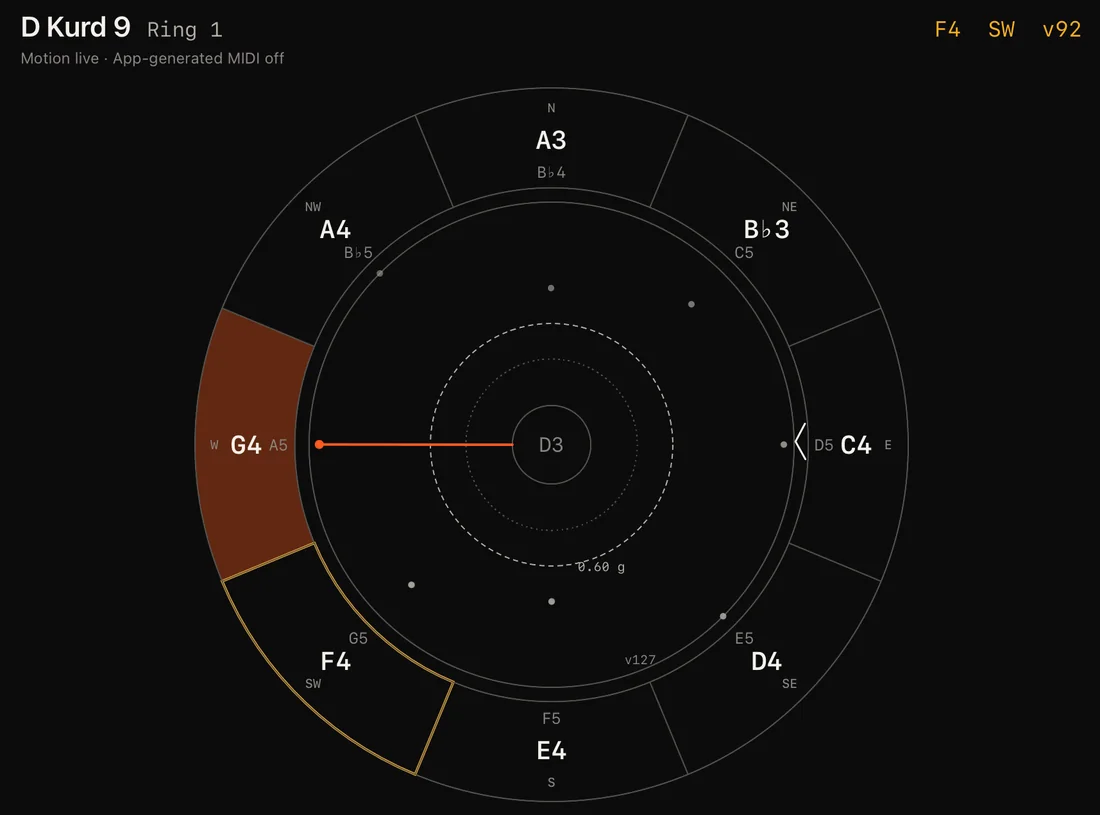
- Instrument view Handpan (prototype): strike in 8 directions, tilt for a second ring and the ding.
- MIDI monitor Every message the instrument sends.
Cheatsheet
Playing modes
| Mode | Motion in | MIDI out |
|---|---|---|
| Tilt + strike | Roll picks 1 of 5–8 notes · tilt fwd/back = octave · strike or tap plays | Note, velocity from impact, set length · strike direction adds octave, 3rd or 5th |
| Tilt notes | Tilt fwd = on · roll steps the scale · tilt back = off | Scale notes, velocity and pressure from depth |
| Theremin | Tilt fwd = on · roll glides · tilt back = off | Note + pitch bend (range set by RPN 0) · depth → expression CC |
| Touch strip Linear sensor | Position = pitch · contact size = pressure | Notes, glide (bend ±24) or scale steps · channel pressure |
In any mode
| Control | Motion in | MIDI out |
|---|---|---|
| Controllers A, B | Rotation speed · pitch fwd/back · roll left/right · centred pitch/roll | Any CC 1–119 · deadzone, smoothing · default CC74 turn, CC1 tilt |
| Tap | Tap or strike | Percussion note, ch 10 by default |
| Directional strikes | Strike in 2, 4 or 6 directions | One percussion note per direction |
| Flick, zig-zag | Wrist flick either way · back-and-forth | 3 notes (base, +1, +2), percussion channel |
Scales: chromatic, pentatonic, major, minor.
Presets
| Preset | Mode | Plays |
|---|---|---|
| Tilt melody | Tilt + strike | C pentatonic, one octave · tilt for octave |
| Strum chords | Tilt + strike | C major · ↓ root ← 3rd → 5th ↑ octave |
| Minor bass | Tilt + strike | A minor, short notes · ↓ note ↑ octave |
| Drum strikes | Strikes | ↓ snare ↑ crash ← kick → hi-hat · ch 10 |
| Tap drum | Tap | Hand clap · ch 10 |
| Tilt scale | Tilt notes | C pentatonic, one octave |
| Theremin | Theremin | Two-octave glide, bend ±24 · depth CC11 · turn CC74 |
| Flick gestures | Flick, zig-zag | Three drum notes |
| Touch strip Linear sensor | Touch strip | Strip notes · turn CC74 · tilt CC1 |
| Touch + expression Linear sensor | Touch strip | Strip notes · roll CC74 · tilt CC1, smoothed |
Handpan instrument view (prototype)
Presets › Handpan instrument (prototype) › Open instrument view. Detection runs in the app from motion data over USB; notes come from the app's MIDI source “Trillium Instrument”, so a music app or synth is needed to hear them.
| Control | Motion in | MIDI out |
|---|---|---|
| Strike | Strike on a stick or a string in 8 directions | One tone field per direction · velocity from strength |
| Tilt | Past 30° · past 60° (both adjustable) | Ring 2 · the ding |
| Scale | Kurd, Celtic Minor, Integral, Hijaz, Pygmy, Amara, Equinox, La Sirena | Any ding E2–A3 · clockwise or alternating layout |